Introducing Rewind: Chrome DevTools for AI Agents
I spent two months debugging a 40-step booking agent. Every time it failed, I’d change the prompt, re-run the whole thing, wait 3 minutes, and check the output. Different result each time because LLMs are non-deterministic. I couldn’t even tell if my fix worked.
That’s the state of AI agent debugging in 2026. We have tracing tools that show you what happened. We have eval frameworks that score outputs. But when I need to go back to a specific failure, change one thing, and re-run only that part? The existing tools don’t do that. Playgrounds let you re-run a single call. Evals score the output. Neither lets you fork a full multi-step execution at step 15 and replay from there with cached context.
So I built it.
What Rewind does
Rewind records every LLM call your agent makes. When something breaks, you fork the timeline at the failure point, fix your code, and replay. Steps before the fork are served from cache (0 tokens, 0 API calls, instant). Only the fixed step hits the LLM.
pip install rewind-agentimport rewind_agent
rewind_agent.init()
# your agent runs normally
# every LLM call is recorded automaticallyThat’s the setup. One line. After your agent runs, you have a full recording. Everything is stored locally in SQLite. Nothing leaves your machine unless you explicitly export or share.
See the full execution tree
The first thing you want when an agent fails: which step broke, and what was the context?
rewind show latest⏪ Rewind — Session Trace
Session: research-agent-demo Steps: 5 Tokens: 1,096
Agents: supervisor → researcher → writer
▼ ✗ 🤖 supervisor (agent) 2.7s
▼ ✓ 🤖 researcher (agent) 1.3s
│ ├ ✓ 🧠 gpt-4o 320ms 156↓ 28↑
│ ├ ✓ 🔧 tool 45ms
│ └ ✓ 🧠 gpt-4o 890ms 312↓ 35↑
├ ✓ 🔧 tool 38ms
▼ ✗ 🤖 writer (agent) 1.5s
└ ✗ 🧠 gpt-4o 1450ms 520↓ 180↑
ERROR: HALLUCINATION: Agent used stale 2019 projection
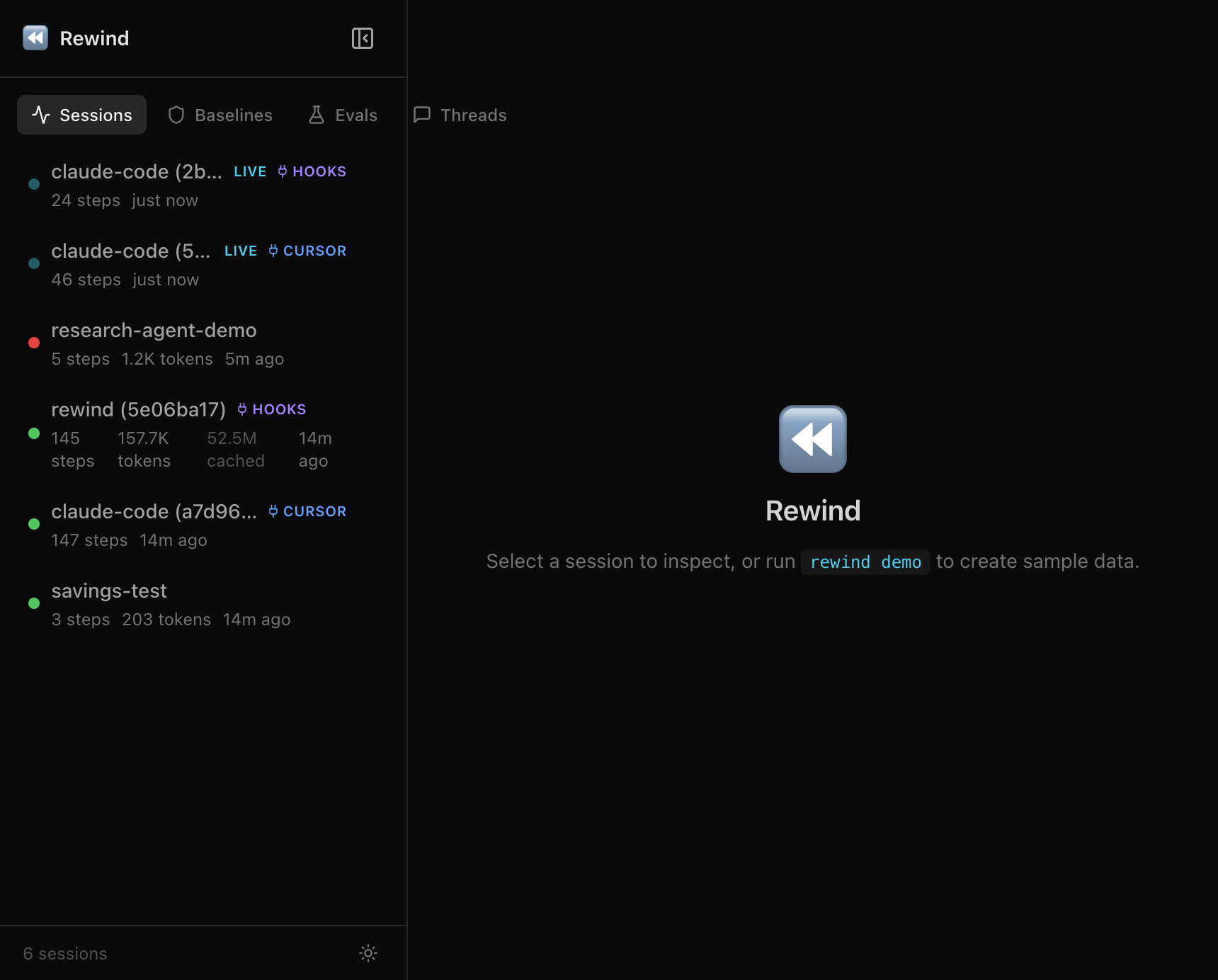
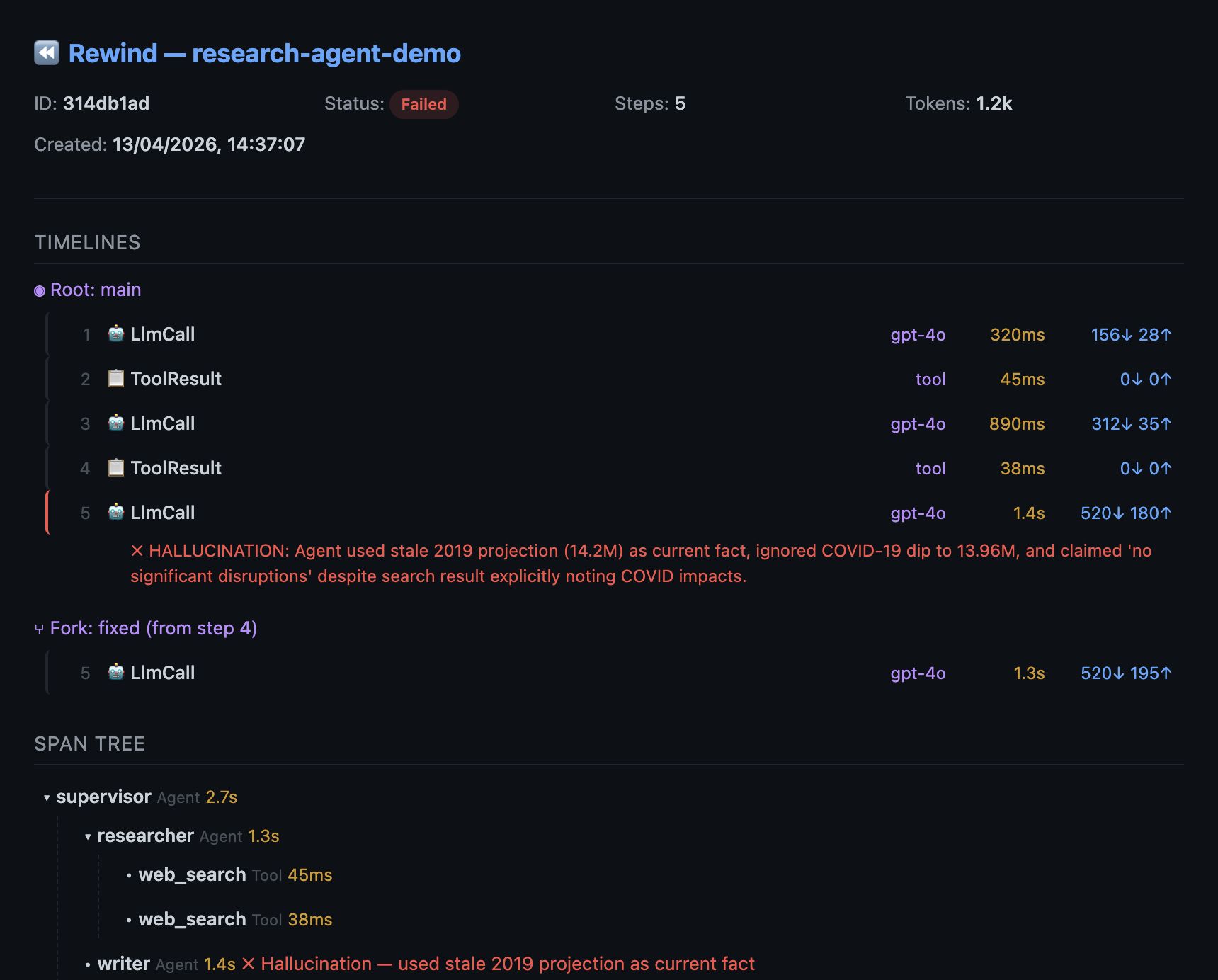
as current fact, ignored COVID-19 dipThat’s a span tree. Agent boundaries, tool calls, handoffs, token counts at each step. The writer agent hallucinated at step 5 because the researcher’s second search returned stale cached data from 2019, and the agent treated a pre-COVID projection as current fact. Without the tree, you’d see a flat list of 5 steps with no agent structure.
Click into any step in the web dashboard to see the exact prompt, system message, and response the model saw:
Fork at the failure, replay with the fix
This is the core idea. Fix your code (add a staleness check, update the prompt, whatever), then:
rewind replay latest --from 4Steps 1-3 are served from cache. Zero tokens, zero API calls. Only step 4+ re-runs live with your updated code. You get a new timeline (“fixed”) alongside the original (“main”).
rewind diff latest main fixed⏪ Rewind — Timeline Diff (main vs fixed, diverge at step 4)
═ Step 1 identical
═ Step 2 identical
═ Step 3 identical
≠ Step 4 [stale data] → [fresh data]
≠ Step 5 [error] 520↓ 180↑ → [success] 540↓ 195↑You can see exactly where the timelines diverge and why. No guessing, no “let me re-run the whole thing and hope.”
Prove the fix with LLM-as-judge
Changed the prompt? Score both timelines automatically:
rewind eval score latest -e correctness --compare-timelines⏪ Rewind — Timeline Scores
Timeline correctness avg
──────────── ─────────── ──────
main 0.200 0.200
fixed 0.950 0.950
Delta (fixed vs main): +0.75 avg ↑Original: 0.2 on correctness. Fixed: 0.95. Not you guessing. An LLM evaluator comparing the output against expected results.
Set up regression baselines for CI:
from rewind_agent import evaluate, llm_judge_evaluator, exact_match

result = evaluate(
    dataset="booking-tests",
    target_fn=my_agent,
    evaluators=[
        exact_match,
        llm_judge_evaluator(criteria="correctness"),
    ],
    fail_below=0.9,
)
CI fails if the score drops below 90%. Ship with evidence.
Share debug sessions
rewind share latest --include-content -o debug-session.htmlGenerates a self-contained HTML file. Open it in any browser, no install needed. The full trace, both timelines, the diff, the scores. Drop it in Slack. Your team sees exactly what broke and the proof that it’s fixed.
Works with your existing stack
Rewind isn’t a replacement for your observability tools. It works alongside them.
Already using Langfuse? Import a broken production trace with one command:
rewind import from-langfuse --trace <id>Fork it, replay with the fix, export the fixed trace back:
rewind export otel latest --endpoint https://cloud.langfuse.com/api/public/otelExport works with any OTel-compatible backend: LangSmith, Datadog, Grafana Tempo, Jaeger.
Providers: OpenAI, Anthropic, AWS Bedrock, any OpenAI-compatible API (Ollama, vLLM, LiteLLM).
Frameworks: OpenAI Agents SDK and Pydantic AI (native, auto-detected), LangGraph and CrewAI (wrapper support), plus any framework via the HTTP proxy.
How it’s built
Single Rust binary. No containers, no database servers, no config files. Everything (CLI, recording proxy, web dashboard, MCP server) is embedded in one executable. The Python SDK auto-downloads it on first use.
Recording works two ways:
- Direct mode (Python):
rewind_agent.init()monkey-patches OpenAI and Anthropic SDKs in-process. Negligible overhead since recording happens in-process with no network hop. - Proxy mode (any language):
rewind record --upstream https://api.openai.com. Point your agent’s base URL at the proxy. Streaming pass-through with sub-millisecond overhead.
The web dashboard runs at http://127.0.0.1:8080 with live updates via WebSocket. Sessions appear as they’re recorded. (Or rewind web --port 4800 if you prefer a custom port.)
Dozens of CLI commands. 26 MCP tools for AI assistants (Claude Code, Cursor, Windsurf) to query recordings from your IDE. MIT licensed.
Try it
pip install rewind-agent
rewind demo && rewind inspect latest
No API keys needed. rewind demo seeds a sample research agent session with a hallucination at step 5 (the agent uses stale 2019 data as current fact). Try show, replay, diff, eval score, share on it.
Or add one line to your own agent:
import rewind_agent
rewind_agent.init()
# run your agent, then: rewind show latest- GitHub: agentoptics/rewind
- PyPI: rewind-agent
- Docs: Getting started
- Website: agentoptics.dev
I’m building Rewind in the open. If you’re debugging AI agents and want to talk about what’s broken, open a discussion.